Best AI Notetaker and Field Notes App for Construction (2026)
Pick by where your decisions get made. We compare tools on phone calls, site walks, meetings, photos, construction documents, and integrations.
Short answer
For jobsite phone calls and site walks that need to become daily logs, RFIs, punch items, and tasks synced to Procore, Autodesk Forma, or Fieldwire, the best pick is Hardline. For notes typed or dictated inside the daily report, use Raken; for tasks pinned to the plan, Fieldwire; for photo and 360 walks pinned to the plan, OpenSpace Field Notes. If you only need to capture audio, a wearable recorder like Plaud does that job.
On this page
- Quick answers
- How to choose by use case
- How the tools compare
- How we compared
- When another tool is the better fit
- When Hardline is the better fit
- Example: one call becomes a daily log entry, a task, and an RFI
- AI call transcription for construction, in short
- What is the best AI call recorder for construction?
- What 75 construction companies told us
- Why meeting notetakers struggle on the jobsite
- AI notetaker vs. field documentation tool
- Four questions to sort the field
- Where Hardline fits
- Related guides
The best AI notetaker for construction is the one that captures the conversation where your decisions actually get made. If that is a Zoom, Teams, or Google Meet meeting, a meeting notetaker like Otter or Fireflies does the job. If it is a photo-heavy walk, a photo tool like CompanyCam fits. If decisions happen on cell phone calls and site walks and need to become daily logs, RFIs, and tasks in Procore, Autodesk Forma, or Fieldwire, you need call capture plus construction outputs. That last job is the one Hardline was built for.
We publish Hardline, so weigh this guide accordingly. Below we say plainly where another tool is the better fit, link each competitor claim to that vendor's own pages, and show how we got the numbers from our research.
If you are here for one specific job: for the end-of-day report, see our construction daily log app and the six daily log problems it should fix. For notes while you walk the site, see AI note taking for walking the jobsite.
Quick answers
What is a construction field notes app? A construction field notes app captures what you see and hear on the jobsite (observations, issues, photos, and conversations) and turns it into project records such as daily log entries, punch items, tasks, and RFIs. The useful ones tie each note to a project, a location, or a photo, so the note becomes something a person can act on instead of a page in a notebook.
Can I take construction field notes by voice? Yes. With Hardline you talk through a site walk or make a phone call as usual, and it drafts daily log entries, punch items, tasks, and RFIs for review before anything syncs to Procore, Autodesk Forma, or Fieldwire. Raken also supports voice-to-text dictation in its daily report notes.
What's the best Android app for taking notes while walking a jobsite? Hardline runs on Android and iPhone. Start on-site capture, walk the job, talk through what you see, and take photos. Capture works offline, and Hardline drafts punch items, tasks, and a daily log entry once you are back in range. See our guide to AI note taking for walking the jobsite.
Are field notes the same as a daily report? No. Field notes are the raw record of the day: observations, conversations, photos, and issues captured as they happen. The daily report, or daily log, is the structured summary filed for the day, covering crews, work performed, deliveries, delays, and weather. Good field notes are what make the daily report accurate.
How to choose by use case
- Office and OAC meetings on Zoom, Teams, or Meet: a meeting notetaker such as Otter, Fireflies, or Granola. These are mature products built for that room.
- Cell phone calls from the truck or the slab: a tool with inbound and outbound call capture on the number you already use. A meeting bot has no meeting link to join on a cell call.
- Site walks and punch walks: a field notes app with on-site capture that ties what you say to photos, works without signal, and produces line items rather than a transcript. On Android or iPhone, see our AI note-taking app for walking the jobsite.
- Photo-first progress documentation: CompanyCam, or a 360 capture tool like OpenSpace for plan-mapped site records. OpenSpace Field Notes pins phone photos and 360 captures to the plan.
- Structured daily report forms your crews already complete: Raken, which takes typed or dictated notes inside the daily report (Raken notes).
- Tasks and punch items pinned to the drawings: Fieldwire, or a punch-only tool like PunchIQ.
- Calls, walks, and meetings in one project record, drafted into construction documents: Hardline.
How the tools compare
This table compares what each tool captures and what it produces. "Partly" means the capability exists with a real limit, described in the cell. "Not reviewed" means we did not find the capability on the vendor's public pages, so we make no claim either way.
| Tool | Phone calls | Virtual meetings | In-person site walks | Photos | Construction document outputs | Construction integrations |
|---|---|---|---|---|---|---|
| Hardline | Yes. Inbound and outbound, on your existing number or a Hardline work number | Yes. Zoom, Google Meet, and Teams | Yes. On-site capture, works offline | Yes. Photos and video tied to the item | Drafts daily logs, RFIs, punch items, tasks, and meeting minutes for review | Procore, Autodesk Forma, Fieldwire, JobTread, Constructable. Synced types differ by tool |
| Otter | No. Calls recorded another way can be imported (Otter help center) | Yes | Partly. Records in-person conversations from its phone app | No | No. General meeting notes and summaries | No Procore, Autodesk, or Fieldwire sync |
| Fireflies | Partly. Through business dialers such as Aircall, RingCentral, and Zoom Phone (Fireflies dialer integrations) | Yes | Not reviewed | No | No. General meeting notes and summaries | No Procore, Autodesk, or Fieldwire sync |
| Plaud and similar recorders | Partly. Device attached to the phone. Plaud does not support calls through headsets | Partly. Records room audio; not a meeting bot | Yes. Carried or clipped device | No | No. Transcript and summary | No |
| CompanyCam | No | No | Yes. Photo-first, with AI Walkthrough Notes narrated over photos | Yes | Partly. Photo reports and walkthrough notes | Partly. Check the integration for the tool you run |
| Raken | No | No | Partly. Daily report entries with voice-to-text dictation | Yes | Yes. Structured daily reports and safety | Partly. Procore integration |
| Fieldwire | Not reviewed | Not reviewed | Yes. Tasks dropped as pins on the plan from a phone or tablet (Fieldwire task management) | Yes. Photos attached to tasks and punch items (Fieldwire punch management) | Yes. Tasks, punch items, and task reports (Fieldwire punch list reports) | Not reviewed for Procore or Autodesk. Hardline syncs to Fieldwire (details) |
| OpenSpace (Field Notes) | Not reviewed | Not reviewed | Yes. Notes from a phone or during a 360 capture, pinned to the plan; can be created offline (OpenSpace release notes) | Yes. Phone photos and 360 captures | Yes. Procore punch items and observations, and Autodesk Construction Cloud issues (OpenSpace Field Notes) | Yes. Procore and Autodesk Construction Cloud, described as bi-directional (OpenSpace integrations) |
| PunchIQ | Not reviewed | Not reviewed | Yes. Mobile-first punch capture with issues pinned to drawings (PunchIQ punch list software) | Yes. AI drafts a punch description from a photo and suggests trade and severity; a person reviews each suggestion | Partly. Punch items, QA/QC observations, and closeout reports | Not reviewed |
| Wearable recorders (e.g. Vibe Dot) | Not reviewed. Vibe's own pages describe phone call support inconsistently | Partly. Records in-person meetings (Vibe Dot) | Yes. Clips to clothing or snaps to a phone; records to the device and syncs to the app over Bluetooth (Vibe Dot help) | Not reviewed | Not reviewed for construction documents. Produces a transcript, summary, and action items | Not reviewed |
How we compared
Sources: every competitor cell comes from that vendor's own public pages (product pages, help centers, and release notes), linked in the table. We did not test competitor products hands-on, we do not score or rank them, and where a vendor's public pages did not settle a capability we wrote "Not reviewed". Features change, so confirm on the vendor's site before you buy. We leave prices out on purpose because plans and promotions change faster than this page does; check each vendor's pricing page. Hardline details reflect Hardline's published product information as of October 21, 2026. Hardline is free to start.
Last reviewed: October 21, 2026.
Update log: October 21, 2026: added Fieldwire, OpenSpace Field Notes, PunchIQ, and wearable recorders to the comparison, plus quick answers on field notes apps.
When another tool is the better fit
- Your decisions happen in scheduled video meetings and the field is not part of the ask. A meeting notetaker is the simpler, cheaper buy.
- Your gap is visual proof of conditions. Progress photos and plan-mapped captures from CompanyCam or OpenSpace beat any voice tool at that job.
- Your crews already complete Raken reports every day and they are good. Adding a voice layer may not be worth the change.
- You want a personal memory aid and nothing synced. A recorder works for one person who wants to remember what was said.
- Your phone problem is front-office lead handling. Call routing, phone menus, and answering services belong to business phone platforms. We compared that trade-off in the construction phone system guide.
When Hardline is the better fit
- Decisions get made on cell phone calls with subs, suppliers, and the architect, and nobody writes them down.
- Your supers need the site walk and the call in one record, not two apps.
- The daily log gets written at the end of the day from memory.
- The output has to land in Procore, Fieldwire, or Autodesk Forma without anyone retyping it.
Limits to know before you choose Hardline. Phone calls need cell signal like any call; on-site capture works offline and finishes the summary once you are back in range. Everything Hardline creates is a draft until someone on your team reviews it. Support for Meta smart glasses is a closed beta, and the Mac app is in beta. What syncs depends on the tool. Procore: daily logs, RFIs, and tasks. Fieldwire: tasks, punch items, daily reports, RFIs, safety observations, and change orders. Autodesk Forma: daily logs and tasks. JobTread and Constructable are also live, and Trimble is coming soon. Anything Hardline drafts can also stay in the Hardline app.
Example: one call becomes a daily log entry, a task, and an RFI
This example is illustrative. The project, people, and details are made up to show the workflow. It is not a customer record.
A superintendent calls the electrical foreman at 7:10am:
- Superintendent: "Level 3 east corridor rough-in has to be done before drywall starts Monday. Are you still on for Friday?"
- Foreman: "Friday is tight. The panel schedule on E-301 puts the corridor lights on circuit 14, but the reflected ceiling plan moved two fixtures. I need to know which one governs before I pull wire."
- Superintendent: "I will get it to the architect today. Can you finish everything except those two fixtures by Friday?"
- Foreman: "Yes, everything but those two. I will have four guys up there Thursday and Friday."
From that call, the drafts come back like this:
| Output | Draft |
|---|---|
| Call summary | Electrical rough-in at Level 3 east corridor to finish Friday, except two fixtures waiting on a location answer. Conflict between panel schedule E-301 and the reflected ceiling plan. |
| Daily log entry | Call with electrical foreman about Level 3 east corridor rough-in. Sub committed to finish Friday except two fixtures pending RFI. Sub stated a crew of four for Thursday and Friday (stated on the call, not counted on site). |
| Task | Send the fixture location question to the architect. Owner: superintendent. Due: today. |
| RFI draft | Subject: Level 3 east corridor fixture locations. Question: Panel schedule E-301 and the reflected ceiling plan show different locations for two corridor fixtures. Which governs? Impact: rough-in for two fixtures on hold; drywall starts Monday. |
Before anything syncs, the superintendent checks three things the call cannot settle on its own: the crew count is what the foreman said, not a headcount; the drawing references are right; and the RFI goes out under the right number and to the right person. The full review routine is in our guide to automating daily reports.
AI call transcription for construction, in short
Most transcription tools were built for video meetings. On a jobsite, the call that matters is a cell call: the sub pushing the pour, the supplier slipping a delivery, the architect okaying a field fix. Hardline takes notes on both sides of inbound and outbound calls on your existing number or a Hardline work number, and drafts what the call created for review. Hardline does not retain phone call audio. That does not remove consent obligations, so turn on disclosure. Setup, headsets, review, retention, and permissions are covered in depth in AI call transcription for construction.
What is the best AI call recorder for construction?
The best recorders for phone calls don't require other gadgets. They live right there on your phone. In construction management, the recording is not the deliverable. The daily log, the RFI, and the task with an owner are.
Recording vs. transcribing. A recorder saves an audio file of the conversation. Hardline transcribes your phone calls and site walks as they happen and drafts the record from the text. Hardline does not retain phone call audio. If you are weighing a hardware recorder or a meeting app, see Hardline vs Plaud and Hardline vs Otter.
Turn your next phone call into a daily log. Hardline does not retain phone call audio.
What 75 construction companies told us
We went through 75 construction companies we had talked with in the year before this guide was first published in June 2026: general contractors, specialty trade contractors, and home builders. Here is what their tool use looked like.
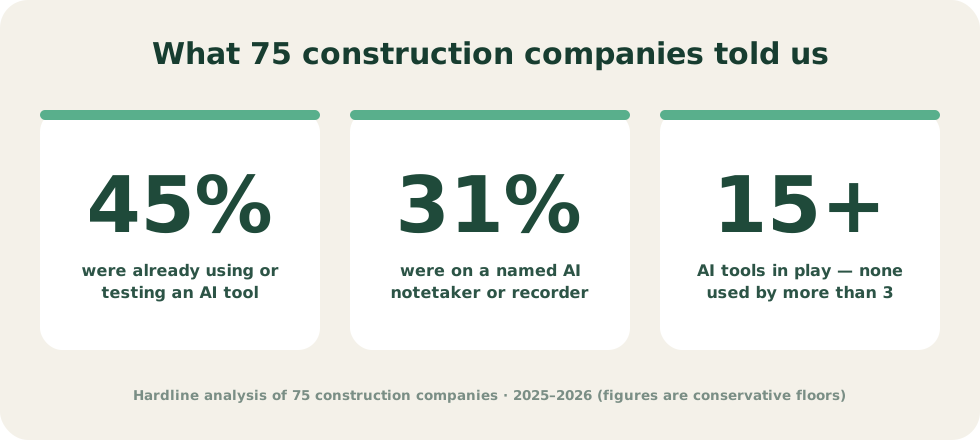
- 45% were already using or testing an AI tool of some kind.
- 31% were using a named AI notetaker, transcription app, or recorder.
- The rest of the AI users were working around the gap with a general LLM or building something internal.
- More than 15 different AI tools were in use across the 75 companies, and no single one was used by more than a handful of them.
A few other patterns: Procore was the most-cited system of record, pen and paper was still the default capture layer at companies of every size, and the recording-law question came up everywhere from Washington and California to Texas and Canada.
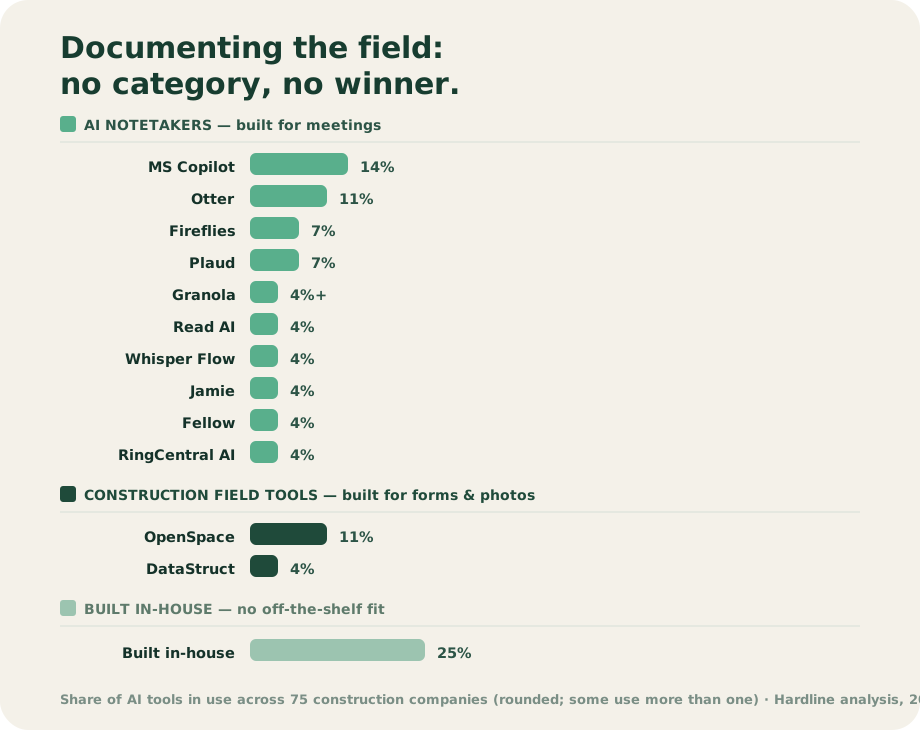
What the field told us, in their own words:
- An ops leader at a GC: "Everyone uses AI note takers." He personally runs Fellow plus Microsoft To Do.
- An HVAC contractor in Calgary: 16 Otter seats company-wide, tried Otter's recorder for field supers, and called the phone integration "awful."
- An AI-forward custom home builder, describing a 60-year-old PM who calls the office to dictate the daily log and then pastes the transcript into a GPT: "We're going all the way around the barn to come in the door."
- An enterprise GC had banned recording-based AI notetakers outright over consent exposure.
How we did the research
- Sample: 75 construction companies Hardline had talked with in roughly the twelve months before June 2026, including general contractors, specialty trade contractors, and home builders, mostly in the US with some in Canada.
- Source: our notes from those conversations. Tool use is what each company told us, not something we audited.
- What counted: "Using or testing an AI tool" includes general LLMs and internal builds. "Named notetaker, transcription app, or recorder" means the company named a specific product.
- Limits: every company in the sample was already talking with a construction AI company, so it is not a random sample and likely leans toward teams interested in AI. The percentages describe these 75 companies, not the industry.
- Not documented, so not reported: the exact date range, the count of each company type, company size, the regional split, and how each conversation was coded. We would rather leave those out than estimate them.
Why meeting notetakers struggle on the jobsite
Otter, Fireflies, Read AI, Jamie, Fellow, and Teams Copilot are good products built for a different room. Point them at construction and three things break.
First, they do not join a cell phone call the way they join a meeting, and a super lives on the phone in a truck. Second, they do not know construction. "Punch the slab on grid line C and tell the EC his rough-in failed" comes back as a generic summary, not a task with an owner and a date. Third, the recording-based ones keep audio, which raises the consent stakes in all-party consent states.
Recorders like Plaud solve the "be in the room" part with hardware, which is one more device to carry and charge, and they still stop at a transcript. (Plaud vs. Hardline goes deeper.) If the wearable you are weighing is smart glasses, see smart glasses on the job site, field tested.
AI notetaker vs. field documentation tool
An AI notetaker (Otter, Fireflies, Granola, Teams Copilot, Read AI) transcribes meetings. A field documentation tool (CompanyCam, Raken, OpenSpace, Procore daily logs) is built for construction: photos, structured daily reports, observations. It captures what you can see and type, not what was said, and it still asks the super to stop and enter it.
The gap between them is the field conversation: the phone call where the supplier slips the delivery, the walk where the architect approves the workaround. It is too unstructured for a field tool and too jobsite for a meeting notetaker. That gap is what a voice-first field notes app is for.
Four questions to sort the field
- Do your people live on the phone? If the work happens on calls, a meeting notetaker or a photo app will miss most of it. Look for call capture, not a bot that joins a meeting.
- Do you need the site walk and the call? Most teams need both. Either accept two tools or pick one that covers both.
- Where do you work, and how will you disclose? Several states require every party to consent before a call is recorded. How a tool handles audio does not remove notice or consent obligations. Pick a tool with an organization-level disclosure setting and get your own legal advice.
- Does it land in your system of record? If the output does not reach Procore, Fieldwire, or Autodesk Forma on its own, someone copies it by hand. Ask which document types sync to the tool you run, not just whether an integration exists.
Where Hardline fits
Hardline is the one we built. The super makes calls like usual with the sub, the supplier, and the architect, walks the job, and joins the OAC meeting. Hardline takes the notes, drafts the daily log, the tasks, the punch items, and the RFI, and syncs them after review. No new device. Keep your existing number or use a Hardline work number. Hardline does not retain phone call audio.
Related guides
- How to automate construction daily reports from calls and site walks: the workflow, a sample report, and a template.
- AI call transcription for construction: call setup, headsets, review, retention, and disclosure.
- AI note taking for walking the jobsite: site walks on Android and iPhone.
- The 10 best recording and note-taking tools for construction: if you are weighing hardware recorders against software.
- One-to-one comparisons: Hardline vs Otter, vs Fireflies, vs Plaud, vs Pocket, vs CompanyCam, and vs Raken.
- Integration details: Procore, Fieldwire, and Autodesk Forma.
Alena Tuttle
See what your next call turns into
Make your calls and walk the job like usual. Hardline drafts the daily log, RFIs, and tasks for you to review before anything syncs.