Where to Start With AI: 5 Prompts for Contractors
Skip the theory. The five prompts I give every contractor, plus the connector setup.

On this page
The most common thing I hear from contractors about AI in construction isn't skepticism. It's this: I know it's a big deal, I just don't know where I'd even start.
I get it. Every explanation of AI for contractors either assumes you write code or tries to sell you a robot dog. So here's the version I actually give people, usually on a call, usually in about five minutes: skip the theory, steal these five prompts.
What's a connector? (two minutes, worth it)
If that word already means something to you, skip straight to the prompts. If it doesn't, spend two minutes here, because I promise this is the part that changes your work life.
An AI assistant with nothing connected to it is a very smart stranger. It can write a poem about rebar, but it doesn't know your jobs.
The missing piece is called a connector (the technical name is MCP): a secure link between an AI like Claude or ChatGPT and an app you already use. Connect your call record and the AI can see what was said on your jobs. Connect your PM platform and it can see the schedule and budget. Connect your email and it can search your inbox and draft replies. The AI acts as you, with your permissions, and you approve everything before it happens.
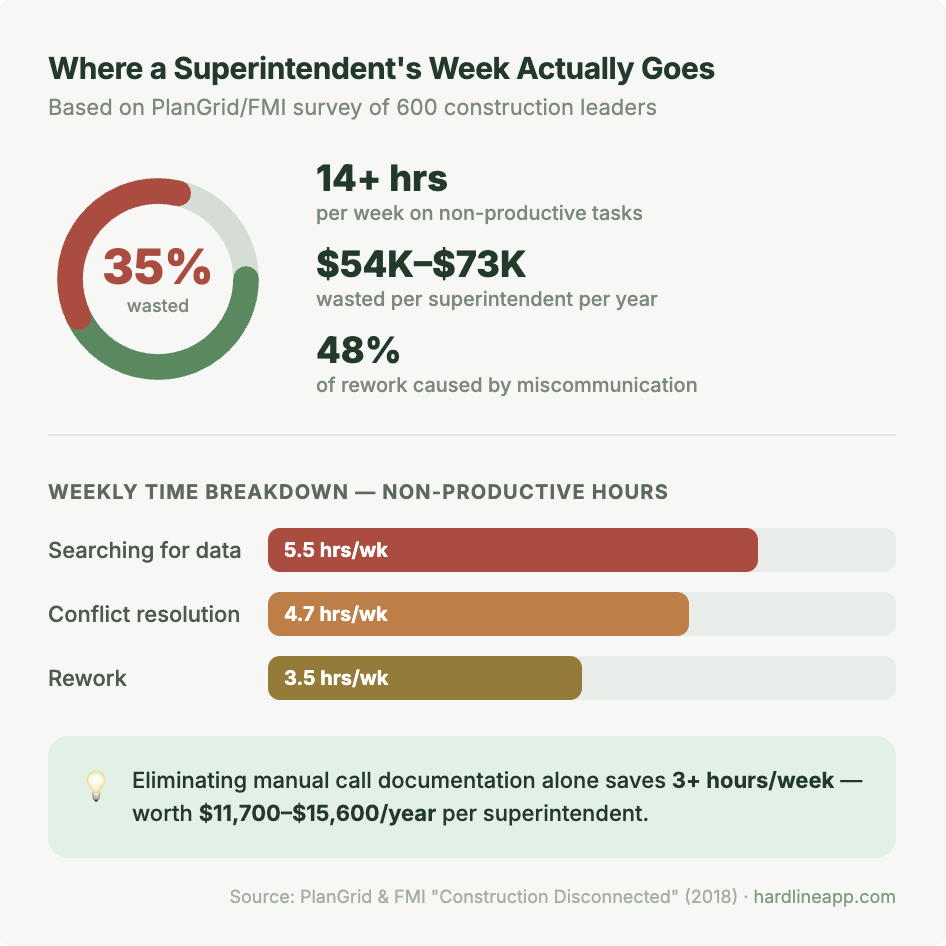
Here's why that's worth two minutes of your attention: right now, none of your apps talk to each other. You are the integration. Every time you retype something from a call into the schedule, or forward an email into a task, you're doing manual labor software should have handled years ago. Connectors are how that stops.
Setup is faster than reading this post. Connecting Hardline to Claude or ChatGPT takes about ten minutes (step-by-step guide here). Gmail and Google Calendar are one click inside Claude itself. Not every system has one yet, but off the top of my head, these do:
- Hardline
The five AI prompts, in the order I'd try them
1. The commitment check
"Summarize my calls from this week. What did each sub commit to, and by when? Draft follow-up confirmation emails to each of them."
Needs: Hardline + email.
This is the one I tell everyone to start with, because it needs nothing but your call record and it pays off the first time you run it. You take dozens of calls a week. People commit to things on those calls. This prompt turns all of it into one list you can actually hold people to. Run it Friday afternoon or Monday morning, whichever version of you needs it more.
2. The who-said-what settler
"Did anyone mention a schedule change on the Maple Street job in the last month? Show me exactly what was said and when."
Needs: just Hardline.
A sub swears he flagged it three weeks ago. You remember it differently. This prompt ends that argument in thirty seconds, with a date and the exact words, before anyone's blood pressure gets involved. I've watched this single prompt turn a shouting match into a shrug.
3. The slip detector
"Compare the commitments from my calls this week against the schedule in [your PM platform]. What's behind, and who do I need to call?"
Needs: Hardline + your PM platform.
Your PM software knows the plan. Your calls know what people actually said. This prompt checks one against the other and hands you the gap, which is where every delay lives before it becomes official. This is the difference between finding out on a Tuesday call and finding out in a Friday meeting.
4. The missing money
"What costs came up in my calls this month that aren't in the budget yet?"
Needs: Hardline + your PM platform (or your cost tracking sheet).
The electrician's verbal quote. The rental extension. The extra mobilization someone mentioned once, out loud, and never again. Before connectors, this question was impossible to answer. Now it's one sentence, and the first time you run it, it will probably pay for your whole setup.
5. The daily log that writes itself
"Write today's daily log from my phone calls: crews on site, work completed, anything that slipped, and anything I need to chase tomorrow. Flag open items separately."
Needs: Hardline.
The daily log is the document everyone needs and nobody wants to write. But you already said everything it needs out loud, on the phone: the pour that got pushed, the crew that showed up short, the delivery that moved to Thursday. This prompt pulls the log from the calls you already made, so it gets written on the drive home instead of never. And six months from now, when someone asks what actually happened on the 14th, you'll have a dated answer instead of a shrug.
Where this goes next
These five are a starting point. Claude and ChatGPT can also read and update your spreadsheets, draft the owner email, and check your calendar before committing you to anything. You can even set scheduled tasks, so at 4 PM every day the AI flags schedule changes from that day's calls before you've left the site.
FAQ
Where should a contractor start with AI? Skip the theory and start with one connector and one prompt. Connect your call record to Claude or ChatGPT, then ask it to summarize the week's calls and list what every sub committed to. It pays off the first time you run it.
What is a connector (MCP) in plain terms? A secure link between an AI assistant like Claude or ChatGPT and an app you already use, like your call record, PM platform, or email. It lets the AI see your real project data, acting with your permissions, and you approve everything before it happens.
Do contractors need to know how to code to use AI? No. Every prompt in this post is a plain-English sentence typed into Claude or ChatGPT. The only setup is connecting the tools, which takes about ten minutes and involves zero code.
Which construction apps have AI connectors today? Hardline, Constructable, JobTread, and BuildPass all have MCP connectors, alongside general tools like Google Sheets, Google Drive, Gmail, Outlook, and Google Calendar.
Can AI write a construction daily log automatically? Yes, if it can see your calls. Connected to a call record like Hardline, the AI pulls crews on site, work completed, slips, and open items from the conversations you already had, and drafts the day's log before you're off the site.
There's so much you can do that it's easy to get overwhelmed. But it's even easier to get started: connect one tool, steal prompt #1, run it Friday afternoon.
Want help getting set up? Reach out.
Alena Tuttle
Ready to capture every conversation?
Hardline turns your calls and site conversations into daily logs, RFIs, tasks, and more, automatically.